
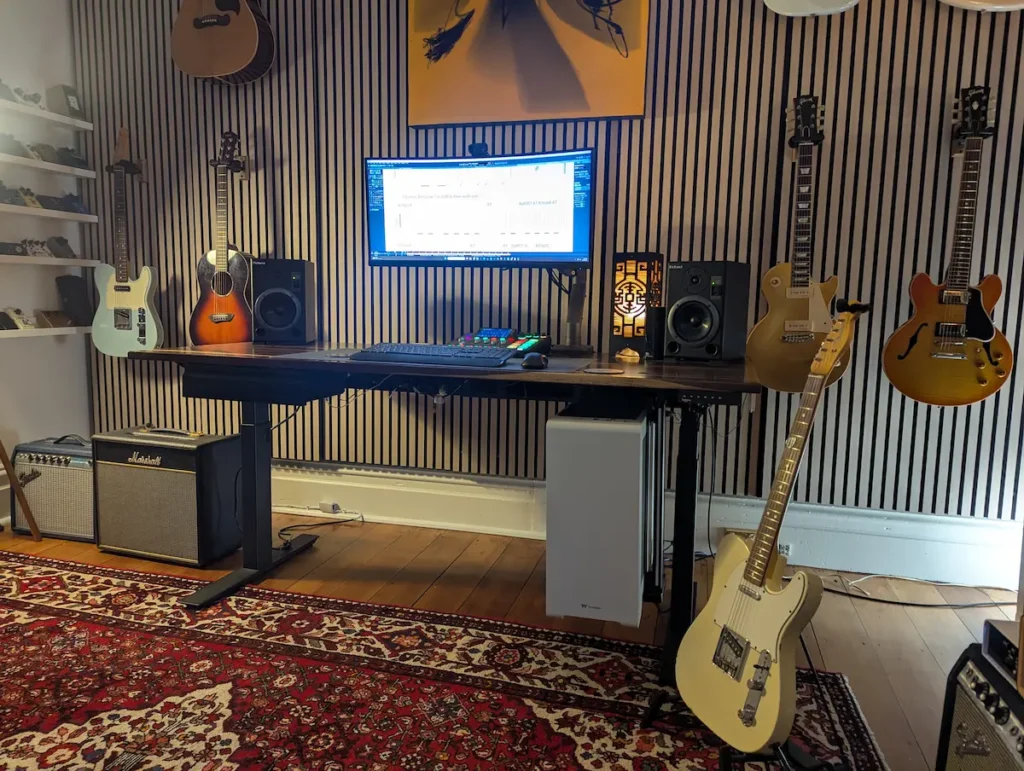
Most home practice setups fail for one reason. Friction. You dig out a cable, hunt for an interface, wait for software to load. By the time you're plugged in, ten minutes are gone and so is your motivation. A proper guitar practice rig fixes that. You sit down, you're ready, and you play.
Here's my own setup, piece by piece. You don't need this exact gear. What matters is understanding the job each part does, so you can build your own version to suit your space and your budget.
The Signal Chain: What Each Piece Actually Does
My chain runs like this. Guitar, amp, UA OX Amp Top Box, Rodecaster Pro 2, PC, then Audacity and a pair of Roland DS5 speakers. It looks complicated on paper. It isn't, once you know why each link is there.
Guitar into amp is the easy part. That's your tone source. For me nothing replaces a real amp for feel and dynamics.
Amp into the OX Amp Top Box is where it gets useful. This is a reactive load box with built-in cabinet simulation. It lets me run a real tube amp at any volume, including dead silent, and still get a proper, cab-simulated signal out the other end. I chose this box because it handles attenuation and cab simulation together. No laptop, no plugin, no extra step before I can play.
Don't want to spend on the top-shelf option? A Two Notes Torpedo Captor X Plus gets you similar attenuation and cab simulation for less. Or skip the load box entirely and run an amp modeller or software amp sim straight into an interface. Real playing feel, any volume, no noise complaints.
Some amps go even further and fold the interface into the amp itself, so there's less to buy and less to plug in. The Marshall DSL1 has a Softube-designed emulated output round the back, so you can run it straight into the line input of your interface and get a proper mic'd-cab tone with nothing else in the chain. The Boss Katana and Positive Grid Spark go a step further still — both double as their own USB audio interface with onboard cab simulation, so you plug straight into the computer with no load box and no separate interface at all.
So why didn't I just use one of those and skip the OX? Because none of them do what I actually needed. The DSL1's emulation is baked in at a fixed low wattage, and the Katana and Spark are modeling amps rather than real tube power stages. I wanted to take a full-power tube amp, the kind that's genuinely too loud for some venues at full volume and not quite loud enough at 5W, and continuously dial the volume anywhere in between while still getting a proper cab-simmed signal out. That's the gap the OX fills for me.
OX Box into the Rodecaster Pro 2 is my interface and mixer. It gets the audio into my PC and sets my levels with one touch on a fader. No hunting through a software mixer every time I sit down. A secondhand Focusrite Scarlett 2i2 does the same essential job for a lot less money. The brand doesn't matter. What matters is turning your signal into audio your computer can use, quickly and reliably.
PC into Audacity is where recording happens. It's also where the real practice work happens, more on that below. Audacity is free, so there's no excuse to skip this part, whatever your budget.
Monitoring through the Roland DS5 speakers matters more than people think. Accurate monitors let you hear what you're actually playing. The pick attack, the dynamics, the detail that laptop speakers flatten out. You don't need these exact speakers. A secondhand pair of entry-level studio monitors still beats built-in laptop sound by a mile.
The Setup Details That Make Your Guitar Practice Rig Work
A few small physical choices do a lot of work.
- Foam risers under the monitors. Placing foam risers under your monitor speakers stops them from vibrating your entire desk.When speakers sit directly on a desk, the bass notes vibrate the wood or plastic underneath them. Your desk actually turns into a giant speaker itself, making the low end sound boomy, muffled, and muddy.The foam absorbs those extra vibrations before they can reach the desk. This gives you a much punchier bass, clearer audio, and a sharper stereo sound so you hear what your music actually sounds like.
- A sit-stand desk, like an UpDown Desk or the Officeworks Chatham electric sit-stand desk. I practice standing some of the time, because I perform standing. Practising in the position you'll actually play in carries over.
- Cables run out of sight. This sounds cosmetic, but it isn't. If your rig takes ten minutes to untangle before you can play a note, you'll practice less often. A permanent, tidy setup means zero setup time, every single day.
Audacity Is Where the Real Practice Happens
Recording software isn't just for capturing takes. It's a genuine practice tool. In fact, this might be the most useful part of the whole setup for anyone learning songs.
Want to see how I use Audacity in my practice routine? Here a video on setting it up and using features that will help you practice smarter. How to Use Audacity to Practice, Slow Down & Learn Guitar Songs
- Loop a section. Grab the four bars you can't play yet and loop them on repeat, instead of scrubbing a YouTube video back every few seconds.
- Slow the tempo down without changing the pitch. Drop the speed, hear exactly what your fingers are doing, then build back up to full tempo gradually.
- Shift the pitch when you need to. If you're learning from a recording that's capoed or in a different tuning, shift the pitch in Audacity to match standard tuning. That way you learn the real shapes on the neck, instead of fighting a mismatch between what you hear and what you're fretting.
You Don't Need My Gear, You Need the Principle
Every piece in this chain does one of three jobs. Get a good signal. Hear it accurately. Remove friction so you actually sit down and play. So match those three jobs to whatever fits your budget: a secondhand interface, secondhand monitors, free software. Do that and you've built the same guitar practice rig in spirit, just at your own price point.
Want an extra tool beyond Audacity? Guitar Pro 8* is worth a look. It's not essential, but it's handy for charting a song and playing back individual tracks, useful if you want to isolate a bass line or a specific guitar part while you're learning.
Build it once, make it permanent, and the friction disappears. That's what actually gets you practising more, not the gear list.
*Quick disclosure: that's an affiliate link for Guitar Pro. You won't pay a cent more, but it does help them know the recommendation came from me.
Gear Links
- Audacity (free): audacityteam.org
- Guitar Pro 8* (affiliate link): guitar-pro.com
- Attenuator, UA OX Amp Top Box: uaudio.com
- Attenuator, Two Notes Torpedo Captor X Plus: two-notes.com
- Sit-stand desk, UpDown Desk: updowndesk.com.au
- Sit-stand desk, Officeworks Chatham Electric: officeworks.com.au
- Interface, Rodecaster Pro 2: rode.com
- Interface, budget option, Focusrite Scarlett 2i2: focusrite.com
Want 1-on-1 gear tips?
Call or email to book your first lesson. Let me know your preferred days and times and I'll get back to you quickly.
$125 / hr incl. GST · In-person Petersham or online · Adults 18+